
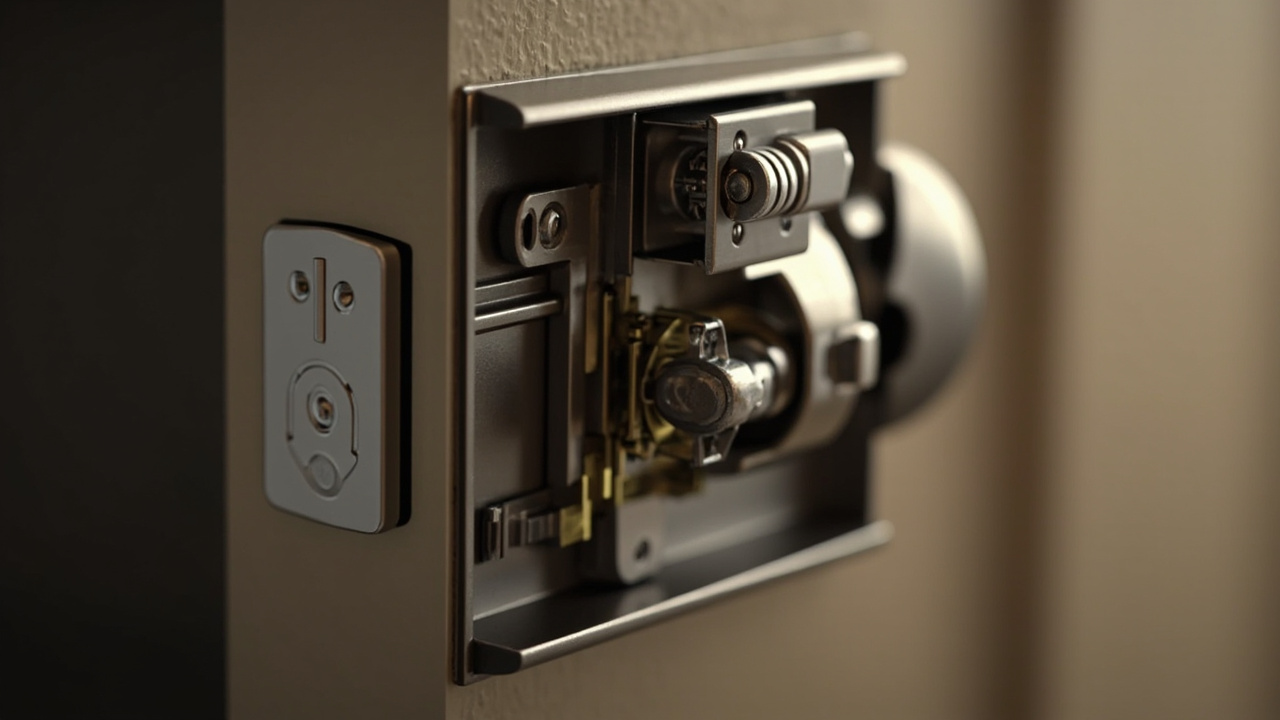
The Door Mounting Interface and Door Compatibility: The Fit Envelope
Qualification starts with the door, not the credential. The door mounting interface door fit envelope is the controlled set of dimensions and hardware relationships that a candidate lock may occupy without an unapproved alteration. This Ops Runbook turns a door schedule into measurable door type codes, captures interface evidence, records a pass, hold or fail result, and releases only the door population that meets every mandatory check. Door compatibility is treated as a set of intersections rather than a single door-thickness number.
flowchart TD
    A["1 Define release boundary"] --> B["2 Code door populations"]
    B --> C["3 Record interface measurements"]
    C --> D["4 Apply mandatory checks"]
    D --> E{"Pass hold or fail"}
    E -->|Pass| F["5 Inspect panel and frame hardware"]
    F --> G["6 Run representative fit trial"]
    G --> H["7 Apply bounded product example"]
    H --> I["8 Close exceptions"]
    E -->|Hold| I
    E -->|Fail| J["Exclude population"]
    I --> K["9 Release controlled population"]
    K --> L["10 Hand off to procurement and installation"]
1. Set the qualification release boundary
Direct answer. Run this stage before a candidate lock enters the approved project list. The output is not a general statement that the lock “fits smart doors.” It is a controlled envelope covering specific door types
Start with the candidate lock’s dated product information and dimension drawings. Record the applicable door thickness, suitable door types, lock body or mortise arrangement, backset, spindle, cylinder, latch, strike and panel dimensions. Where the supplier has not supplied a dimension, mark the item as missing evidence rather than estimating it from a photograph.
| Runbook input | Minimum record | Entry condition |
|---|---|---|
| Candidate lock | Dated product information and dimension drawings | Every physical interface used in the decision is identified |
| Door schedule | Door leaf, frame and hardware descriptions | Doors are separated into controlled type codes |
| Installation survey | Measurements linked to each door type code | A representative measurement supports every released type |
| Exception register | Holds, conflicts and approved alternatives | Each item is closed, excluded or still marked as a hold |
| Change record | Drawing and door-schedule revisions | The release identifies the revision it covers |
A qualified release must also identify what it excludes. If the evidence applies only to one swing direction, door construction or hardware arrangement, do not generalize it to visually similar doors.
2. Convert the door schedule into controlled type codes
Do not allow “standard door” to become an uncontrolled category. Give each candidate population a type code that captures the variables capable of changing the interface. At minimum, distinguish leaf thickness, construction, rebate, frame arrangement, swing direction, existing hardware and whether a door closer or hold-open device is present.
Use an installation survey to validate the schedule against the physical site. The Office Smart Lock Site Survey provides a useful pattern for organizing office door observations, while the Smart Lock Retrofit Site Survey can guide surveys where existing hardware must remain in place.
| Type-code field | Record | Why it affects qualification |
|---|---|---|
| Leaf construction | Solid, composite, metal or another identified construction | Determines drilling, rebate and reinforcement considerations |
| Leaf thickness | Measured value and applicable door thickness range | Controls the first dimensional comparison |
| Frame arrangement | Door edge, stop, rebate and keeper relationship | Controls mortise, latch and strike alignment |
| Swing and handing | Hinged side and opening direction | Controls panel, lever and internal geometry |
| Existing hardware | Handles, cylinders, closers and hold-open devices | Identifies obstruction and reuse decisions |
| Site condition | Access, working clearance and installation constraints | Defines the conditions included in the release |
Do not collapse two type codes merely because their photographs look alike. A small rebate change, different frame depth or altered handing can invalidate a fit result even when the visible panel footprint is unchanged.
3. Capture the interface measurement record
Use the candidate lock drawings while taking the measurements. Record the supplier’s drawing terminology and stated dimensional basis so that the backset measurement, lock body/mortise envelope and panel dimensions are not mixed with definitions used by another supplier.
The measurement sheet should contain values, units, source and photographs where practical. If a drawing gives a tolerance, record it exactly. If no tolerance or dimension is supplied, retain that gap in the exception register.
| Measurement group | Record before qualification |
|---|---|
| Leaf thickness | Thickness at the intended lock location against the applicable door thickness range |
| Rebate | Width, depth, edge position and usable fixing area |
| Backset | The measurement defined by the candidate lock drawing, linked to its datum |
| Lock body/mortise | Case dimensions, fixing centers, door-edge clearance and required internal depth |
| Spindle and cylinder | Spindle section, required length, cylinder and collar or rose geometry |
| Latch and deadbolt | Projection, travel, faceplate and relationship to the frame |
| Strike plate and keeper | Plate size, fixing positions, keeper dimensions and frame material condition |
| Panel and lever | Panel dimensions, fixing centers, handle or lever projection and operating clearance |
| Frame hardware | Door closer, hold-open device and other frame-mounted components |
Attach a marked photograph showing the tape or scale in the measurement plane. The photograph supplements the value; it does not replace it.
4. Compare every interface against a pass, hold or fail rule
The decision table below is the practical control for the door mounting interface door fit envelope. A door type is released only when every mandatory row passes. A hold means the evidence is incomplete. A fail means a recorded conflict remains and no approved alternative has closed it.
| Interface | Pass | Hold | Fail |
|---|---|---|---|
| Lock body and rebate | The case fits the recorded rebate and internal depth | A rebate or fixing dimension is missing | The case cannot enter or secure in the available space |
| Backset and spindle | The recorded positions and dimensions align | The datum is unclear | An approved alternative cannot align the operating elements |
| Cylinder and collar or rose | The door preparation matches the candidate arrangement | Bore or fixing details are incomplete | The cylinder interface conflicts with the leaf or frame |
| Latch and strike | The latch, faceplate and keeper form a workable relationship | Strike or keeper details are unverified | The bolt cannot engage without unapproved modification |
| Panel and lever | The panel fits and the lever clears the frame and hardware | Fixing or operating clearance is not demonstrated | The panel or lever fouls an adjacent element |
| Frame and operating hardware | The door can operate across its intended travel | The closer or hold-open arrangement needs confirmation | Recorded interference prevents normal operation |
Treat an unresolved hold as outside the released population. It should not appear as an approved exception hidden in a general compatibility statement.
5. Inspect the panel, handle and frame-hardware zone
A compatible lock body does not by itself prove that the complete door is compatible. Inspect the escutcheon or panel footprint, fixing locations, handle or lever sweep, spindle path and collar or rose position. These elements must be evaluated together because moving one interface can affect the others.
Check the leaf and frame with the door in its intended operating positions. Record the available space around the panel edge and lever return. If a door closer or hold-open device is present, compare its position and movement with the proposed panel and lever rather than treating it as unrelated building hardware.
Some project schedules identify doors as subject to fire, egress or accessibility controls. Maintain a separate evidence trail for those classifications.
CONFIRM-WITH-LOCAL-CODE-AND-FIRE-DOOR-APPROVAL: Confirm the responsible authority, required product evidence and installation conditions for each controlled door class before release.
A fit result should identify whether reuse of an existing handle, cylinder, closer or hold-open device is accepted for that door type. Otherwise, the field installer may treat an unresolved component as permission to improvise.
6. Run a representative fit trial and retain evidence
Use a representative leaf-and-frame arrangement when one is available. Keep the candidate lock package with its relevant drawings at the trial and check the internal case position, fixing access, panel placement, spindle engagement, cylinder interface, latch-to-strike relationship and operating clearance.
Record the trial as a pass, hold or fail rather than as a general observation. For example, “lock case seated and fixed, but panel conflicts with frame stop” is more useful than “does not fit.” The second statement does not reveal which interface failed or what evidence is missing.
The The Door Mounting Interface Test Evidence a Buyer Can Actually Request provides a useful framing for demanding evidence that can be reviewed. Retain a minimum photo set showing:
- The complete door and frame before installation.
- The rebate, backset and leaf-thickness measurements.
- The lock body or mortise seated in the door.
- The panel and handle or lever in operating position.
- The latch, deadbolt and strike plate aligned.
- Any closed exception with its approval reference.
Where a representative physical trial cannot be completed, record the missing trial as a hold and identify what evidence is needed. A drawing review can support qualification, but it should not be relabelled as a physical fit result.
7. Apply the supplied hotel-lock example without overextending it
The supplied SLK-9936S hotel-lock record provides a bounded example: applicable door thickness of 36–100 mm, a 5-pin cylinder and a 3-point latch. Confirm on the dated product page for the specific SKU before using any of those values to release a purchase or installation scope.
| Interface input | Supplied SLK-9936S record | Qualification treatment |
|---|---|---|
| Door thickness | 36–100 mm | Compare the measured leaf with the range, then complete every other interface check |
| Cylinder | 5-pin | Compare it with the door preparation and cylinder arrangement required for the candidate package |
| Latch | 3-point | Verify its frame relationship and hardware arrangement rather than treating the field as a complete fit result |
This example does not establish backset, lock body/mortise dimensions, panel dimensions or frame clearances by itself. Those fields remain separate release items. The purpose of the example is to show how a supplier field can narrow the candidate population while leaving other checks open.
8. Control exceptions and prevent silent substitutions
Use the exception register to turn missing information and physical conflicts into owned decisions. A hold should identify the missing evidence, responsible party and required resolution. A fail should identify the conflicting dimensions or relationship and the available corrective route.
When reviewing supplier information, compare the physical claims against the supplied drawings rather than treating a broad compatibility statement as complete evidence. The Reading the Door Mounting Interface Claims in a Supplier Datasheet provides a structured way to identify which claims have dimensional support.
Use these controls:
- Hold: A drawing, measurement or trial is missing. Keep the door type outside the release until the evidence arrives.
- Fail: The recorded geometry conflicts. Select another lock package, revise the door type or exclude the population.
- Revise: An alternative changes a dimension or component. Open a new record and rerun all affected checks.
- Reject: No documented alternative resolves the conflict. Remove the door type from the project release.
The The Door Mounting Interface Failure Modes Seen on Smart Lock Projects can help distinguish a missing-document problem from a physical interference. Do not approve an adaptor, relocated fixing or modified strike arrangement unless a dimensioned document supports it and the project owner accepts the change.
9. Release the approved door population as a controlled record
The release gate should be signed against a defined evidence package. Include the candidate lock and drawing revision, approved door type codes, applicable door thickness, measured door and frame dimensions, fit-trial result, closed exceptions and any conditions affecting installation or inspection.
Use one of three release states:
| Release state | Meaning | Procurement and installation use |
|---|---|---|
| Released | Every mandatory check passes for the named type codes | May proceed within the stated drawing and site conditions |
| Conditional | A specified condition remains or a population is limited | May proceed only within the written limitation |
| Not released | A check is failed or the evidence is incomplete | Do not include in the order or installation scope |
Reopen the release when the lock drawing changes, the door schedule changes, a type code is added, or site measurements differ materially from the recorded values. A revised door schedule should not be absorbed silently into an existing qualified envelope.
10. Hand off the envelope to procurement and installation
The procurement request should translate the accepted measurements into a scope suppliers can quote against. Ask for the applicable door thickness, suitable door types, lock body/mortise arrangement, backset, cylinder, latch, strike and panel dimensions, plus dimension drawings, an installation guide and a datasheet on request.
Include the approved door-type register, representative measurements and fit-trial evidence in the request package. These records prevent a quote from being compared against a different physical assumption. They also give the installer a clear basis for rejecting a substitution that changes the qualified envelope.
The practical counterpart to this point is the smart lock cloud platform. That is the same question door mounting interface door fit envelope has to answer here.Submit the controlled door-type register with the request a quote so the commercial response, sample request and installation scope can reference the same physical basis. A release tied to dated measurements is more useful than a general claim that a lock suits every door.